Saturday, 3 May 2014

24 resources and tools to inspire digital marketing beginners

There are lots of posts on the internet detailing free tools for marketers.
In this one, though, I thought I'd throw in some that aren't necessarily for marketers, but which I use regularly.
I've called this post 'tools for beginners' but in reality the tools aren't for beginners, they're for everyone. It's just that if you're a beginner you might not have found your set ways of working yet, and you might want to pick something up before you've ground your way into the groove.
From meme makers to some in-depth analytics, here's what I find useful.

Copywriting, content and search

1. Google Trends Hot Searches

All of Google Trends is useful, of course, but I thought I'd highlight Hot Searches.
You can keep your finger on the pulse and find inspiration for social media engagement, newsjacking blog pieces, etc. One can also access a lovely visualisation of what's hot.
google trends hot searches

2. Soovle

Whack some keyphrases into Soovle to find other popular keyphrases.
Its ease of use makes Soovle very handy for ideation on the hoof.

3. Google image search filters

Starting out as you mean to go on is important. Make sure you create web pages with the correct mark-up and tagging, as well as using images that are licensed for reuse.
This 'labeled for commercial reuse' Google filter in image search allows you to find images you can use without sweating.
google image search

4. Awesome screenshot

Does what it says on the tin. Allows you to edit the shot before you save or copy it.
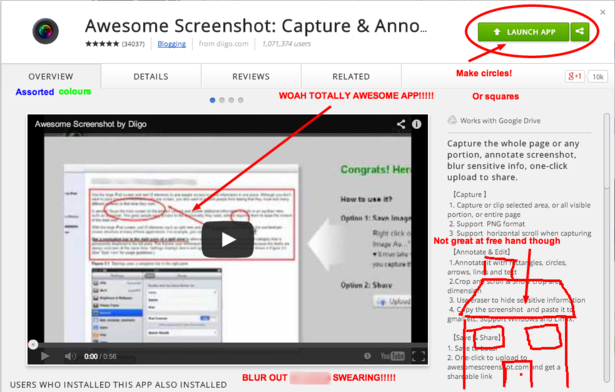
awesome screenshot

5. Paint

Awesome screenshot was included as the antidote to Microsoft Paint. But, the print screen button is often your only option if you want to accurately capture a still from a dynamic webpage.
On a PC, I defy you to find a simpler program to paste into, resize in, and then save from as a JPEG, PNG or GIF.

6. Jing

An Apple computer is ideal for screencasting, using QuickTime. But if you can't do that, try Jing. The screencast is uploaded to the Jing servers, but you can link to it and embed it.
jing

7. Piktochart

Piktochart is a very powerful way to create infographics. You can do a lot of it for free. It also helps with posters and more. I did this one in five minutes.
newspaper

8. An iPhone

I've found that if you're in the business of using apps and mobile media, an iPhone is really the only device you need.
David Moth, our deupty editor, uses an Android but often has to borrow my phone when testing an iOS-only app.
Of course, there are some advantages of an Android. For a while, you needed one to sync with Google Glass, though MyGlass is in the Apple app store, now.
Just something to bear in mind.
  iphone app  iphone app

Social media and relationship building

9. Followerwonk

It does many things. Below you can see followers' activity over the day, so you know when best to tweet.
Followerwonk will also show you how many followers you've gained and lost over a period of time.
One of the most useful features is the bio search, which you can use to find like-minded individuals, particular job titles you'd like to connect with, or people who love your brand so much they mention it in their profiles.
followerwonk

10. Google hangouts

Hangouts are a bit annoying, in that they are limited to nine users if you want to have them privately. But public hangouts are fine for a lot of uses, and you can record straight to a linked YouTube account.
Click through for a tutorial.
google hangout

11. Meme generator

Memes are very important. And this is the easiest way to make them. Click the meme below (one of mine) to go to my favourite generator.
join audioconference, ravage host

12. Undo button in Gmail

More of a way to prevent the undoing of relationships, this button is my constant companion. For any newbies afraid of saying the wrong thing, you'll have five seconds to repent and undo.
Click the pic for this hack and more.
gmail laba

13. IFTTT

You can use IFTTT for many things. With social media you can identify churn, autotweet a blogpost and lots more.
The acronym stands for 'if this then that' and the tool allows you to set up rules based actions. If you want an email every time it's raining in your neighbourhood, you can do it.
ifttt

Reading

14. Econsultancy Beginners’ Guides

These are a handy intro to core subjects and many are free to download. The Econsultancy Buyer's Guides also have a good amount of background reading on the topic in question.
A personal favourite report of mine, if you're skilling up on new trends, is Programmatic Marketing: Beyond RTB.
econsultancy beginners guides

15. Feedly

Pocket is extremely useful for saving reading for later, but an RSS feed is the best for creating one place to visit when you want to devour everything that's new, in the search for fresh ideas.
Feedly is one of the best, and you can sign in with Twitter. If you do so, it'll automatically suggest reading based on who you follow on Twitter. Very handy.
feedly

16. The Daily Pulse

Sign up for Econsultancy's daily skill pill (email) by clicking below.
daily pulse

17. Some smart blogs

There's lots of reading out there, but I thought I'd nod towards Avinash Kaushik, for no-nonsense marketing and analytics best practice, and MIT Tech Review, if you like looking forward to things yet to disrupt the market.
You can add these first to your RSS of choice.

Analysing

18. Google Chrome DevTools

If you want to see what's going on in the site code, just right click and 'inspect element' when using Chrome.
You can then debug JavaScript if you know what you're doing, or you can just use it to check what other sites are up to by clicking the network tab. This will show you what's firing on the page at what time.
google devtools

19. Open Site Explorer

Amongst other things, you can use this Moz tool to check out backlinks to a webpage. One can use the 'just discovered' tool to look at recent links to your site.

20. MozBar

Another Moz tool, the MozBar plugs into your browser and delivers SEO metrics on site, as well as a search results page overlay.
mozbar

21. Wordle

A simple tool but I find it very powerful. Copying and pasting all the text from a webpage into Wordle and then creating a word cloud is just one of the potential uses.
I find this gives me a good understanding of the copy and messaging on a particular page. Can be useful for checking your own work, or for the creative process.

Tracking

22. Realtime Google Analytics dashboard

Here's a dashboard showing realtime blog traffic that we use a lot at Econsultancy. Click the screenshot to get the dashboard. There are plenty more dashboards rounded up by Graham Charlton.
ga dashboard

23. Search columns in Hootsuite or Tweetdeck

A simple one but if you're not constantly looking at brand mentions on Twitter, not just your at-replies, you'll miss positive and negative sentiment.
hootsuite

24. Google alerts

You need to know if your PR is actually working, right?
Here you can avoid the shame of having to Google your own brand. Nobody wants to feel like Ed Balls.

Google Goes All in on Mobile Apps With AdWords Updates


Google is making a big bet on mobile app marketing, judging by the new and improved AdWords features it announced recently.
Innovative new ad formats are designed to drive greater engagement, allow for more effective app promotion, and boost measurement capabilities for companies offering their audience a mobile app.
The updates are likely motivated by rapidly increasing app usage, which is stealing from Web-usage time, and Google's need to shore up Google Play, which made just 13% as much revenues compared to Apple in 2013.
Here are the highlights from the recently announced Google AdWords updates.
Enhanced App Discovery and Installation With New AdWords Features
Engagement is critical, but first, you have to get your app in front of the right audience and installed on their devices. Google aims to make this easier with new ad targeting options that allow advertisers to home in with greater intent on audiences.
Now, you'll be able to see keyword suggestions based on searches from the Google Play store and target users based on which apps they use. For example, a women's clothing retailer with a mobile app could choose to promote its app through AdWords to people who already have women's fashion apps installed on their phones. Even better, Google will consider not only which apps are installed but how often they're used and the user's history of in-app purchases.
That gives brands greater control over their AdWords spend when promoting their app. It also helps expand your potential audience without sacrificing specificity or intent.
App Promotion Comes to YouTube and Google Display Network
Until now, you could only promote app ads in Google Search. This latest update expands the App Promotion ad format to YouTube and the Google Display Network, giving you far greater reach. This is pretty huge for advertisers, considering there are about 25 billion ad impressions per day on the GDN (an estimate based on our internal data).
This is a much-needed update, as the current Google App promotion ad format has been a complete failure. Only a few hundred million apps have been downloaded as a result of Google App Promotion ads. That might seem like a lot, but bearing in mind there have been 50 billion app downloads on Google Play so far, it's only 0.4% or so (which is nothing).
AdWords will now also allow you to direct people from TrueView ads on YouTube right to the app install, instead of to an app landing page.
Boost Engagement With Deep-Linking for Apps
You don't always want to send people to your app download page. This is particularly true when you're trying to boost app engagement or promote offers to people who already have your app on their device.
Google has added deep-linking for apps to AdWords. That means you can use your ad to point people directly to a page within your app. For example, a fitness brand could create an AdWords ad with a promotion on treadmills; with deep-linking, an existing app user's ad click will take them inside the app, to the treadmill product page (or whichever in-app location the advertiser prefers).
People love apps—but the vast majority of installed apps aren't used regularly or they are simply deleted. Using this new AdWords feature to point people inside the app with highly relevant, specific offers is a huge boon for app marketers.
Coming Soon: Conversion Measurement Across the App Lifecycle
Paid search advertisers have to be able to accurately measure ROI, and app marketing is no different. Google has promised it'll soon roll out improved measurement capabilities that will allow advertisers to track and measure each installation, engagement, and in-app purchase.
If you aren't seeing all those new features and functions in your AdWords dashboard yet, fear not! Google will be rolling them out to more users in the coming months.

Source: http://www.marketingprofs.com/opinions/2014/25024/google-goes-all-in-on-mobile-apps-with-adwords-updates

Friday, 2 May 2014

You Can Drive Traffic and Conversions With These 3 Twitter Cards

Over the past year, Twitter has enhanced its ads platform with new targeting options, creative ad units, and measurement tools to help you better achieve your direct response marketing goals. Features like tailored audiences, Lead Generation Cards, and conversion tracking have all delivered strong ROIs to advertisers.
As an advertiser, you’re always looking for new ways to drive relevant traffic back to your website, product page, or blog post. Tweets offer one of the most convenient ways of doing this. However, sometimes you need more than 140 characters to get your message across, which is why Twitter Cards have become such a valuable tool in your arsenal.
Here are a couple examples of Twitter Cards that can be used to increase traffic and conversions, as well as some tips on how you can get started.

Twitter Website Cards

website-cards
Recently, a powerful new ad unit began rolling out to Twitter’s mobile and desktop advertisers. Called the Website Card, it offers you a new way of not only surfacing website content within a tweet, but also of driving relevant traffic back to any page of your website.
With the Website Card, consumers are able to preview an image, related context, and a clear call-to-action in their timelines before clicking through the tweet. This enables easy discovery of interesting content while giving advertisers the ability to drive a higher volume of URL clicks. The Card can also be used in conjunction with conversion tracking to measure end-to-end conversions.
Twitter has tested the card with a handful of brands like Citrix and Betabrand, both of which saw significant decreases in cost-per-click (CPC) compared to campaigns that used an image and URL to drive website traffic. Betabrand’s CPCs were reduced by up to 85 percent while Citrix saw a 92 percent decrease. Additionally, the mobile company Three saw a 26 percent higher engagement rate as well as a 64 percent increase in URL clicks when using Website Cards.

Twitter Lead Generation Cards

lead-generation-cards
Lead Generation Cards make it easy for advertiser to find and connect off-Twitter with consumers. It allows people to express interest in what your brand offers, while enabling them to easily and securely share their contact information without leaving Twitter or having to fill out a cumbersome form.
Outdoor gear and apparel company Rock/Creek used the card in a Promoted Tweet campaign to collect email addresses of people who wanted to enter to win a free pair of sandals. The campaign saw a 4.6 percent engagement rate and generated more than 1,700new email contacts in less than one week.
Mount Washington College, which is part of the Kaplan Higher Education group, worked closely with Adobe to increase awareness, create engagement, and generate leads for enrollment. Adobe created a Promoted Tweet campaign with Lead Generation Cards for @MW_College. This method increased the school’s conversion rate by 101 percent while decreasing the cost-per-lead by 55 percent.

Twitter Product Cards

product-cards
Product Cards let you feature retail items on Twitter and help drive sales. This card is designed to showcase your products with an image, description, two item-specific details (like price and availability) and most importantly, a call-to-action. It’s a great way to promote new products as well as showcase your top-sellers.
UK-based Harveys Furniture was one of the first major retailers in the country to adopt Product Cards and it paid off. According to reports, doing so enabled the company to triple its clickthrough rates within a month.

Best Practices for Twitter Cards

twitter-cards-best-practices
When given the opportunity to customize your call-to-action, always opt for a strong one. Think about what it is you want consumers to do and choose the strongest and clearest variation using the least amount of words possible. For example, “sign up here” or “download the whitepaper” are two very solid options.
Regardless of which Twitter Card you’re using, make sure that you create a compelling one. Choose an image that best represents your offer or product and make sure that the description is relevant and adds value. Remember, you still have to get people interested in your tweets in order for them to see your call-to-action.
When using Lead Generation Cards, don’t stop when the sign-ups do. Send a follow-up email to ensure the recipient is engaged with your brand. It goes without saying that this email should provide something of value to avoid coming across as spam.
And finally, always test and re-test. Create variations with different images and calls-to-action. Choose the one that’s resonating the most, and later revisit it to ensure it’s still working for newer audiences. Never stop improving.